How to Clean Phone Storage Without Deleting Apps

Is your phone storage running low, but you don’t want to lose any of your favorite apps? You’re not alone.
Many people struggle to free up space without deleting the apps they rely on every day. The good news is, you can clean up your phone’s storage quickly and easily without losing a single app. Imagine having more room for photos, videos, and new downloads, all while keeping your apps intact.
Keep reading, and you’ll discover simple, effective ways to clear space and boost your phone’s performance right now.
Free Up Cache Data
Freeing up cache data is a simple way to clear space on your phone without deleting apps. Cache stores temporary files that help apps load faster. Over time, this data builds up and uses a lot of storage. Clearing cache can make your phone run smoother and free up storage quickly.
Clear App Cache
Each app saves cache to improve performance. You can clear this data without losing app information. Go to your phone’s settings, then find the apps section. Select an app and tap on “Clear Cache.” This removes temporary files but keeps your app data safe. Repeat for apps that use a lot of storage.
Browser Cache Cleanup
Web browsers save cache from websites to load pages faster. This data can grow large over time. Open your browser’s settings and find the privacy or history section. Choose the option to clear browsing data, but only select “Cached images and files.” This frees space without deleting saved passwords or bookmarks.
Credit: www.imobie.com
Manage Media Files
Managing media files is a smart way to clean your phone storage without deleting apps. Photos and videos often take up the most space. Organizing and moving these files frees up storage fast. Small steps make a big difference.
Delete Duplicate Photos
Duplicate photos clutter your phone and waste space. Use a photo cleaner app to find copies. Delete the extras to save storage. This process is quick and easy. Your gallery will feel lighter and more organized.
Move Videos To Cloud Storage
Videos are large and fill storage quickly. Upload videos to cloud services like Google Drive or iCloud. This keeps them safe and accessible anytime. After uploading, remove the videos from your phone. This method saves space without losing your videos.
Use Storage Optimization Tools
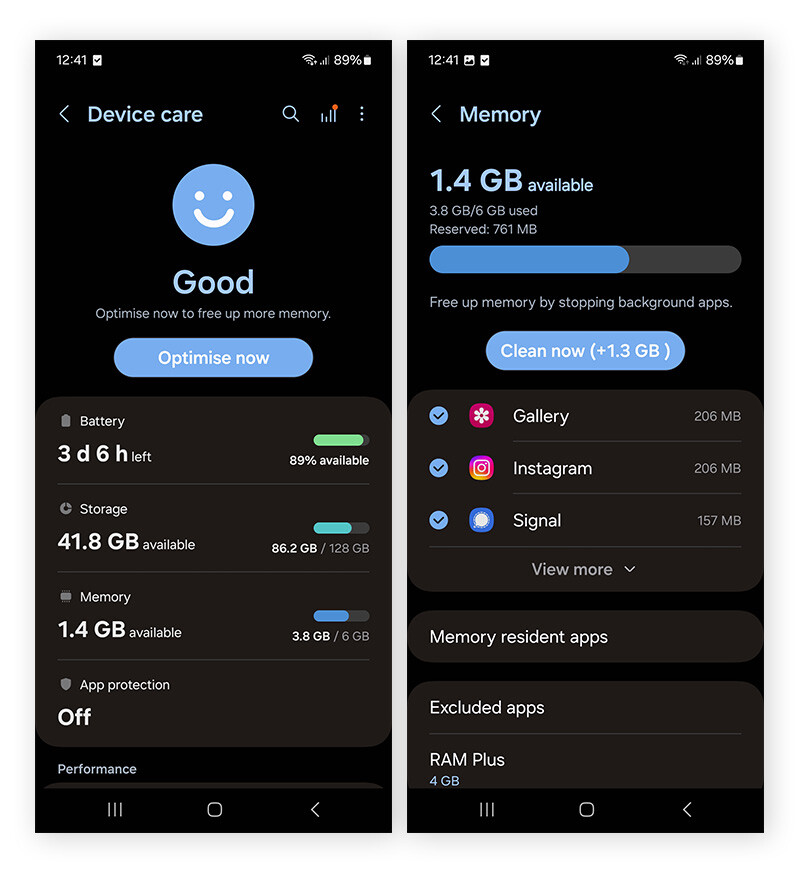
Using storage optimization tools helps free up space without deleting apps. These tools clear cache, temporary files, and other junk data. This process improves phone speed and saves storage. You can use built-in tools or third-party apps for this task. Both options are easy to use and safe for your device.
Built-in Storage Managers
Most smartphones have built-in storage managers. These tools scan your phone for unnecessary files. They show you what takes the most space. You can delete cache, old files, and duplicates directly from the manager. This method is quick and does not harm your apps.
Built-in managers also suggest ways to save space. For example, they might recommend deleting large files or unused media. These tools are free and come with your phone. They work without installing extra software.
Third-party Cleaning Apps
Third-party cleaning apps offer more features than built-in tools. They can find hidden junk files and clean app caches deeply. Some apps also help manage photos and videos to save space.
Choose apps with good reviews and regular updates. These apps are easy to use and guide you step-by-step. They help keep your phone storage optimized without deleting important apps. Always check app permissions before installing to keep your data safe.
Handle Downloaded Files
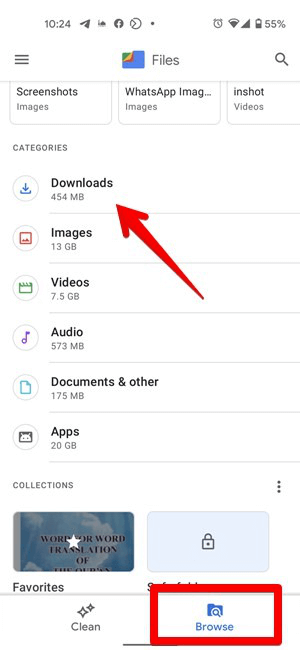
Downloaded files often take up a lot of space on your phone. These files include documents, images, videos, and other media. Managing these files helps free up storage without removing your apps. It also keeps your phone organized and easier to use.
Review And Delete Old Downloads
Check your downloads folder regularly. Remove files you no longer need. Old documents, pictures, and videos can pile up fast. Deleting these files frees up valuable space. You can do this easily through your phone’s file manager or download app.
Organize Files For Easy Access
Create folders to sort your downloaded files. Group similar files together, like work documents or photos. This makes finding files quicker. Use clear folder names that make sense to you. Organizing files also helps spot duplicates and unnecessary items to delete later.
Clear Messaging App Data
Clearing messaging app data helps free up space on your phone without deleting apps. Messages and media files can take up a lot of storage. Removing old data keeps your phone running smoothly. It also helps keep your chats organized.
Focus on cleaning your messaging app by deleting old conversations and removing media from chats. These steps reduce clutter and save storage space effectively.
Delete Old Conversations
Old message threads use storage even if you do not read them anymore. Go through your chats and find conversations you no longer need. Delete these chats to clear space. This action removes all messages in that thread. It is quick and can free up a lot of storage.
Remove Media From Chats
Pictures, videos, and voice notes in chats take more space than text. Look for large media files in your messaging app. Delete photos and videos that are not important. Save the ones you want to keep to your gallery first. Removing media from chats can free up a large amount of phone storage.
Manage Offline Content
Managing offline content is a smart way to free up phone storage. Many apps save files for use without internet. These files can take a lot of space. Removing some offline content does not affect app functions. Focus on maps, music, and podcasts saved on your device.
Delete Offline Maps
Offline maps help you navigate without internet. They are useful but can use much storage. Open your map app and check saved areas. Delete maps you no longer need. This clears space but keeps the app intact. Update maps only when necessary to save more space.
Clear Offline Music And Podcasts
Music and podcasts apps often save files offline. These files take up space quickly. Open your music or podcast app settings. Find the offline or downloaded section. Remove songs and episodes you already listened to. This frees storage but keeps the app and your playlists. Download only favorite content for offline use.
Optimize App Data Usage
Optimizing app data usage helps free up phone storage without deleting apps. It reduces unnecessary data stored by apps. This keeps your phone running smoothly and saves space for important files.
Limit Background Data
Apps use data even when not open. This is called background data. Limiting it stops apps from storing extra data. Go to your phone settings and find data usage options. Turn off background data for apps that use too much. This saves storage and battery life.
Clear App Data Without Deleting
App data includes cache, temporary files, and settings. Clearing this data frees space but keeps the app installed. Go to settings, then apps, and select the app. Tap on storage, then clear cache or clear data. Clearing cache removes temporary files safely. Clearing data resets the app but does not delete it. This helps reduce storage use without losing the app.
Credit: www.avast.com

Credit: www.youtube.com
Frequently Asked Questions
How Can I Free Up Phone Storage Without Removing Apps?
Clear cached data, delete old files, and move photos to cloud storage. These steps free space while keeping apps intact.
What Files Can I Delete To Save Phone Storage Safely?
Remove duplicate photos, old downloads, and unused media files. These typically occupy space without affecting app functions.
Is Clearing App Cache Better Than Deleting Apps?
Yes, clearing cache frees storage without losing app data or settings. It improves performance without uninstalling apps.
Can I Move Files To Sd Card To Save Phone Storage?
Absolutely, transferring media and documents to an SD card frees internal storage. It keeps apps installed and functional.
Conclusion
Cleaning phone storage without deleting apps is simple and effective. Clear cache and remove old files regularly. Use built-in tools to free up space quickly. Manage photos and videos by moving them to cloud storage. These steps keep your phone fast and organized.
Save important data without losing apps you need. Try these tips to maintain your phone’s storage easily. Your device will work better and last longer. Small actions make a big difference in storage management. Keep your phone clutter-free and enjoy smoother performance every day.