Why Does Internet Slow down at Night Every Day

Have you ever noticed your internet slowing down every night, just when you want to stream a show or finish some work? It’s frustrating, right?
You might wonder why this happens so regularly and what’s causing your connection to drag just when you need it most. Understanding why your internet slows down at night can help you take control and find solutions that work for you.
Keep reading to uncover the surprising reasons behind this common issue—and how you can fix it.
Peak Usage Hours
Internet speed often drops during certain times each night. These times are known as peak usage hours. Many people use the internet at the same time. This high demand affects how fast your connection feels.
High Traffic Impact
During peak hours, many users stream videos, play games, and browse websites. This creates heavy traffic on the network. More users mean more data moving at once. The network struggles to keep up with all the requests. This slows down the internet speed for everyone.
Network Congestion
Network congestion happens when data traffic exceeds the network’s capacity. Think of it like a crowded road during rush hour. Too many cars cause traffic jams. Similarly, too much internet traffic causes delays. Data packets take longer to reach their destination. This leads to slower loading times and buffering.
Isp Bandwidth Limits
Internet Service Providers (ISPs) set bandwidth limits for users. Bandwidth is the maximum amount of data that can pass through your connection. During peak hours, ISPs manage bandwidth to avoid overload. They may reduce speeds for some users temporarily. This helps maintain service quality but lowers speed for heavy users.
Home Network Factors
Home network factors can cause your internet to slow down at night. Many devices connect to the Wi-Fi at the same time. This can use up the available bandwidth quickly. Small issues inside your home network affect internet speed. Understanding these helps improve your connection.
Multiple Device Connections
More devices mean more data use. Phones, tablets, computers, and smart TVs compete for bandwidth. At night, families often use many devices together. Streaming videos, online games, and video calls take heavy data. This overload can slow down your internet.
Wi-fi Interference
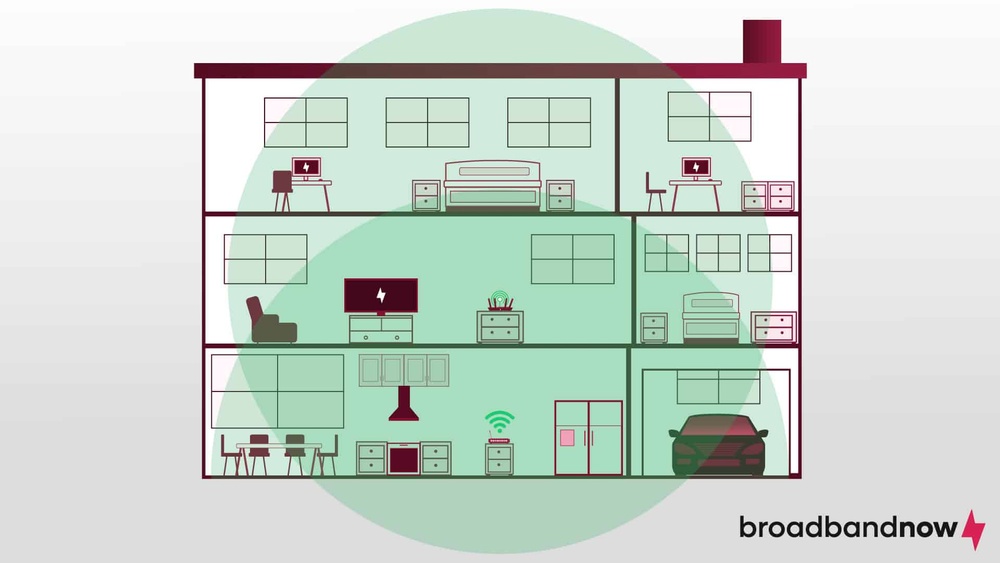
Wi-Fi signals can get weak or noisy. Walls, furniture, and appliances block signals. Other nearby Wi-Fi networks also cause interference. This makes your connection unstable or slower. Moving the router or changing the channel helps reduce interference.
Router Performance
Old or low-quality routers struggle with heavy use. They may overheat or slow down over time. Routers have limits on speed and device capacity. Restarting the router or upgrading it can improve internet speed. Keeping firmware updated also helps maintain performance.
Isp Throttling
Internet speed often drops at night because of ISP throttling. This happens when your internet provider slows down your connection on purpose. They do this to manage the network and keep it stable for all users. Throttling can affect video streaming, gaming, and browsing at night.
Data Caps And Limits
Many ISPs set data caps on monthly usage. If you cross this limit, they may reduce your speed. This slow down usually happens during peak hours, often at night. The goal is to prevent heavy users from using too much bandwidth. This helps ISPs control network traffic efficiently.
Traffic Management Policies
ISPs use traffic management to keep networks running smoothly. They slow down high-traffic users during busy times. Nighttime is a peak period because many people use the internet then. Throttling reduces congestion and avoids network crashes. It keeps the internet fair for everyone.

Credit: www.alamy.com
External Influences
External factors often play a big role in internet speed changes at night. These influences affect how data moves through networks. Understanding them helps explain why your connection might slow down.
Weather Effects
Weather can disrupt internet signals, especially for wireless connections. Rain, snow, or strong winds weaken signals between your home and service towers. Storms cause temporary outages or slower speeds. Even thick clouds can reduce signal strength. This effect is more noticeable at night due to weather changes. Weather also impacts satellite internet, causing delays and slower data transfer.
Infrastructure Maintenance
Internet providers often perform maintenance during night hours. This timing limits disruption to most users. Maintenance includes updates, repairs, and upgrades to network equipment. Sometimes, this causes temporary slowdowns or brief outages. Maintenance keeps the network reliable but may reduce speed in the short term. Providers notify users about planned work to prepare for possible slowdowns.
Ways To Improve Nighttime Speed
Nighttime internet slowdowns can be frustrating. Many people experience this issue daily. Improving your nighttime speed helps you stream, browse, and work smoothly. Simple changes in your setup can make a big difference. Here are some practical ways to boost your internet speed at night.
Optimizing Router Placement
Place your router in a central spot in your home. Avoid corners, walls, and metal objects nearby. Higher locations, like shelves, often improve signal strength. Keep the router away from devices that cause interference. This helps your Wi-Fi reach all rooms better. A strong signal means faster internet and fewer drops.
Upgrading Internet Plans
Check your current internet plan speed. Nighttime slowdowns may happen if your plan is too slow. Consider plans with higher speeds for better performance. Internet providers offer different packages for heavy users. Upgrading can handle more devices and traffic at once. A better plan often reduces lag during peak hours.
Using Wired Connections
Wi-Fi can be unstable and slow at times. Connecting devices with an Ethernet cable improves speed. Wired connections are faster and more reliable than wireless. Use cables for gaming, streaming, or important work tasks. This reduces interference and keeps your connection steady. Wired internet often outperforms Wi-Fi, especially at night.
Credit: www.alamy.com
Credit: my.clevelandclinic.org
Frequently Asked Questions
Why Does Internet Slow Down At Night Daily?
Internet slows at night due to peak usage when many users connect simultaneously. This congestion overloads networks, reducing speeds for all. ISPs may also throttle bandwidth to manage traffic. Evening streaming, gaming, and work increase demand, causing the common nightly slowdown.
How Do Isp Traffic Limits Affect Night Speeds?
ISPs implement traffic management to prevent network overload during peak hours. At night, when usage spikes, they may limit bandwidth for some users. This ensures fair distribution but can cause slower speeds. Traffic shaping helps maintain network stability but impacts internet performance during busy times.
Can Wi-fi Interference Cause Nightly Slowdowns?
Yes, Wi-Fi interference can worsen at night due to more device usage. Microwaves, cordless phones, and neighbors’ networks create signal noise. This interference reduces connection quality and speeds. Using 5GHz bands or wired connections can help improve nighttime internet performance.
Does Internet Slow Down Due To Router Issues At Night?
Routers can overheat or become overloaded with multiple devices at night. This reduces their efficiency and slows speeds. Restarting your router regularly and updating firmware can enhance performance. Ensuring your router is modern and placed optimally also helps maintain consistent speeds.
Conclusion
Internet slows down at night due to high user traffic. Many people stream videos, play games, and browse together. This overloads the network and reduces speed. Your internet provider shares bandwidth among users, causing delays. Routers and modems also face more demand.
To improve speed, try using wired connections or change usage times. Understanding this helps reduce frustration. Slow internet at night is common but manageable with simple steps.