Why Does My Speaker Sound Distorted Suddenly

Have you ever been enjoying your favorite song or a movie, only to have your speaker suddenly start sounding distorted? It’s frustrating and can ruin the entire experience.
You might wonder, “Why does my speaker sound distorted all of a sudden? ” The good news is, you’re not alone, and this problem is usually fixable. You’ll discover the common reasons behind that annoying distortion and simple steps you can take to bring your sound back to life.
Keep reading, because your perfect sound is closer than you think.
Credit: www.dell.com
Common Causes Of Speaker Distortion
Speaker distortion can happen suddenly and ruin your listening experience. Understanding common causes helps fix the problem fast. Distortion usually means the speaker is not playing sound correctly. This can be due to different issues inside or outside the speaker.
Overdriving The Speaker
Playing audio too loud can damage the speaker’s parts. Overdriving means sending too much power or volume. The speaker cannot handle extreme signals and creates distorted sound. Keep volume at a reasonable level to avoid this problem.
Damaged Speaker Components
Speakers have delicate parts like cones and coils. These parts can tear or break over time. Physical damage causes poor sound quality and distortion. Dust, moisture, or dropping the speaker may harm these parts.
Poor Audio Source Quality
Low-quality audio files often sound bad. Compressed or corrupted files lose details. Playing bad files makes the speaker produce distorted sound. Use clear and high-quality audio for the best results.
Connection Issues
Loose or faulty cables create poor connections. Bad connections cause crackling and distortion. Check all wires and plugs for tightness and damage. Replace any faulty cables to restore clear sound.
Environmental Factors Affecting Sound
Environmental factors can change how your speaker sounds. These changes can cause sudden distortion. Understanding these factors helps you fix or avoid sound problems. The environment around your speaker plays a big role in sound quality.
Interference And Electrical Noise
Other electronic devices can cause interference. This noise can make your speaker sound distorted. Common sources include microwaves, routers, and cordless phones. Keep your speaker away from these devices. Using shielded cables also reduces electrical noise.
Room Acoustics
The room’s shape and size affect sound waves. Hard surfaces reflect sound and create echoes. Soft items like curtains absorb sound and reduce distortion. Too many reflections make the sound unclear. Adjusting your speaker’s position can improve sound clarity.
Humidity And Temperature Effects
High humidity can harm speaker components. Moisture may cause short circuits or corrosion. Temperature changes also affect speaker performance. Heat can damage parts, while cold may stiffen materials. Keep your speaker in a dry, stable environment for best sound.
Troubleshooting Speaker Distortion
Speaker distortion can be frustrating. It often happens suddenly, ruining your listening experience. The good news? Many causes are easy to find and fix. This section helps you troubleshoot speaker distortion step-by-step. Follow these simple checks to find the problem fast.
Checking Cables And Connections
Start by looking at all cables connected to your speaker. Loose or damaged cables often cause distortion. Unplug each cable and plug it back in tightly. Check for bent or broken wires. Replace any cables that look worn out. Also, clean the ports if they have dust or dirt. A poor connection can affect sound quality.
Testing With Different Devices
Try playing sound from another device. This helps find if the problem is with the speaker or your main device. Use a phone, tablet, or computer to test. If the distortion stops, your original device might be the issue. If distortion continues, the speaker is likely the cause. Testing with different devices narrows down the source quickly.
Inspecting Speaker Hardware
Look closely at the speaker itself. Check for visible damage like cracks or dents. Press on the speaker cones gently to feel if they move smoothly. Broken cones or loose parts cause distorted sounds. Also, ensure the speaker is not overheated. Overuse can harm the hardware and change the sound. Fixing or replacing damaged parts can restore clear sound.

Credit: squarerepair.co.uk
Preventing Future Distortion
Preventing future distortion helps protect your speaker’s sound quality. Taking simple steps keeps your audio clear and enjoyable. Avoid damage and extend your speaker’s life with good habits.
Proper Volume Levels
Keep the volume at a moderate level. Loud sounds strain the speaker’s parts. High volumes cause the sound to break or crack. Adjust the volume to avoid pushing your speaker too hard.
Regular Maintenance
Clean your speakers often to remove dust and dirt. Dust can block sound and cause distortion. Check cables and connections for damage. Fix or replace worn parts quickly to keep sound clear.
Using Quality Audio Sources
Play music from good quality files or streams. Low-quality audio files have poor sound and cause distortion. Choose formats like MP3 or WAV with higher bitrates. Better sources give your speaker a clean, smooth sound.
When To Seek Professional Help
Knowing when to seek professional help for a distorted speaker can save you time and money. Some problems are easy to fix at home. Others need expert tools and skills. Acting fast can prevent more damage. Understanding the signs of internal damage is the first step. Then, consider whether to repair or replace your speaker.
Signs Of Internal Damage
Distorted sound may mean internal damage. Buzzing, crackling, or popping noises are warning signs. If the speaker cuts out during use, it might have a loose connection. A burning smell or visible smoke means serious damage. The speaker may also make no sound at all. Physical damage inside is often not visible. Professionals can open and check parts safely. Ignoring these signs can cause complete failure.
Repair Vs Replacement Considerations
Deciding to repair or replace depends on the damage extent. Small issues like loose wires are often repairable. Large damages to cones or magnets may need replacement. Repair can cost less but may not last long. Replacement offers better sound quality and durability. Check the speaker’s age and price before deciding. Professional advice helps make the right choice. Sometimes, a new speaker is more cost-effective.
Credit: www.healthyhearing.com
Frequently Asked Questions
Why Does My Speaker Suddenly Sound Distorted?
Sudden speaker distortion often results from damaged drivers or loose connections. Overloaded amplifiers or poor audio files can also cause distortion. Checking cables and reducing volume can help identify the issue quickly.
Can Software Issues Cause Speaker Distortion?
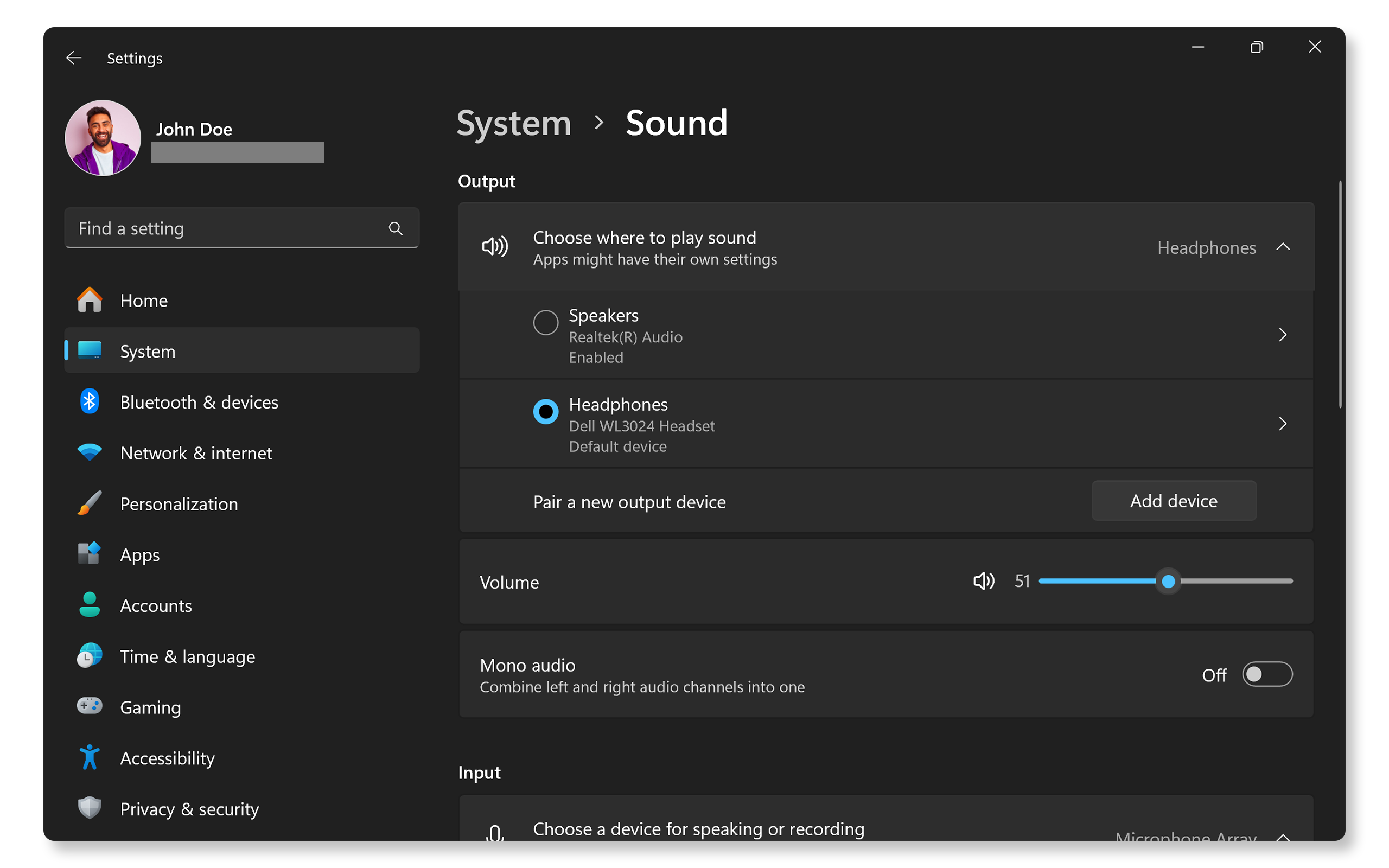
Yes, outdated or corrupted audio drivers can cause distortion. Software conflicts or incorrect sound settings might also degrade audio quality. Updating drivers and adjusting sound settings usually fix the problem.
How To Fix A Distorted Speaker Sound Quickly?
Start by lowering the volume and checking all cable connections. Restart your device and update audio drivers. If distortion persists, test speakers on another device to isolate hardware issues.
Does Speaker Distortion Affect All Audio Types?
Distortion can occur with any audio type but is more noticeable in high bass or complex sounds. Compressed or low-quality files may also increase distortion, especially on lower-end speakers.
Conclusion
Speaker distortion can happen for many simple reasons. Dust, loose wires, or wrong settings often cause the problem. Fixing these issues usually brings sound back to normal. Regular checks help keep your speaker clear and strong. Don’t ignore sudden changes in sound quality.
Small steps can make a big difference. Stay patient and try easy fixes first. Good sound means better listening every time.