How to Improve Posture While Typing on Laptop

Are you tired of feeling neck pain or back stiffness after long hours of typing on your laptop? Your posture while working can make all the difference between comfort and discomfort.
The good news is, small changes in how you sit and type can protect your body and boost your focus. Keep reading to discover simple, effective tips that will help you improve your posture right now—and keep you feeling great throughout your workday.
Your body will thank you!
Credit: www.saintalphonsus.org
Common Posture Mistakes
Poor posture while typing on a laptop causes discomfort and long-term problems. Many people do not notice their posture mistakes. These common errors strain muscles and joints. Correcting them helps reduce pain and improve focus. Here are some frequent posture mistakes to watch for.
Slouching And Forward Head
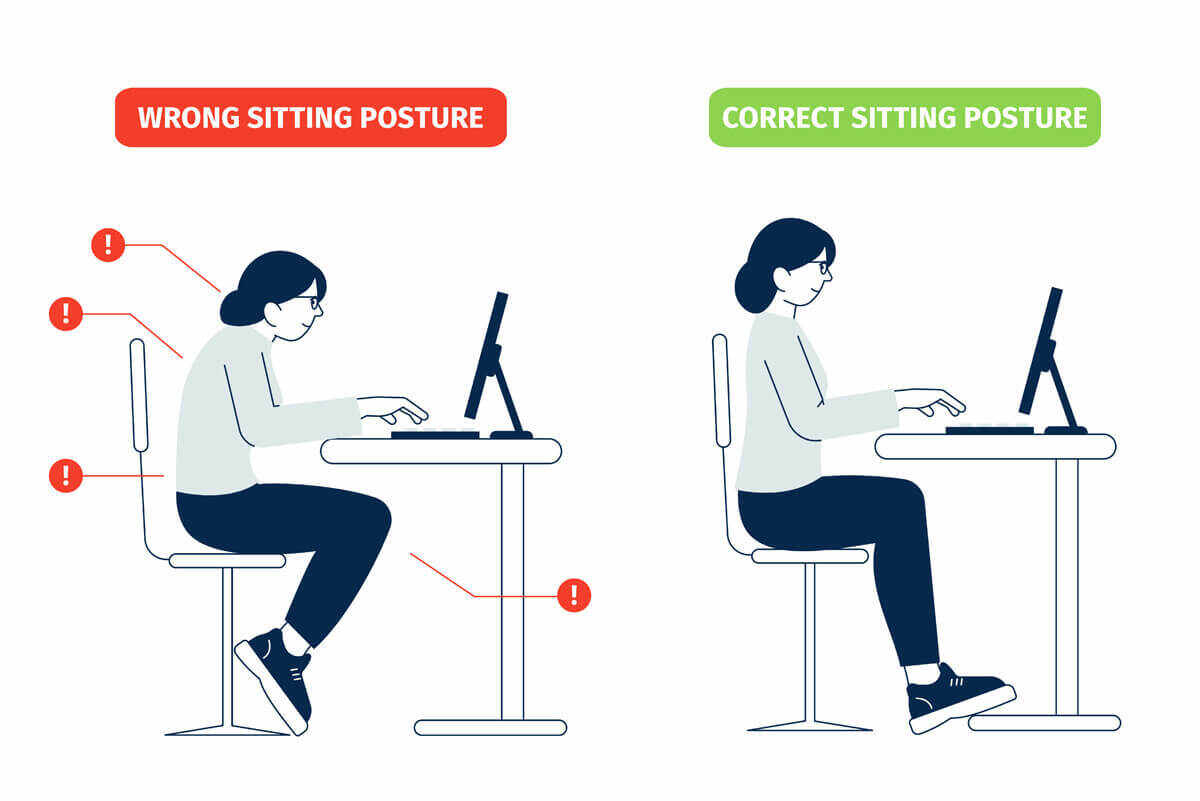
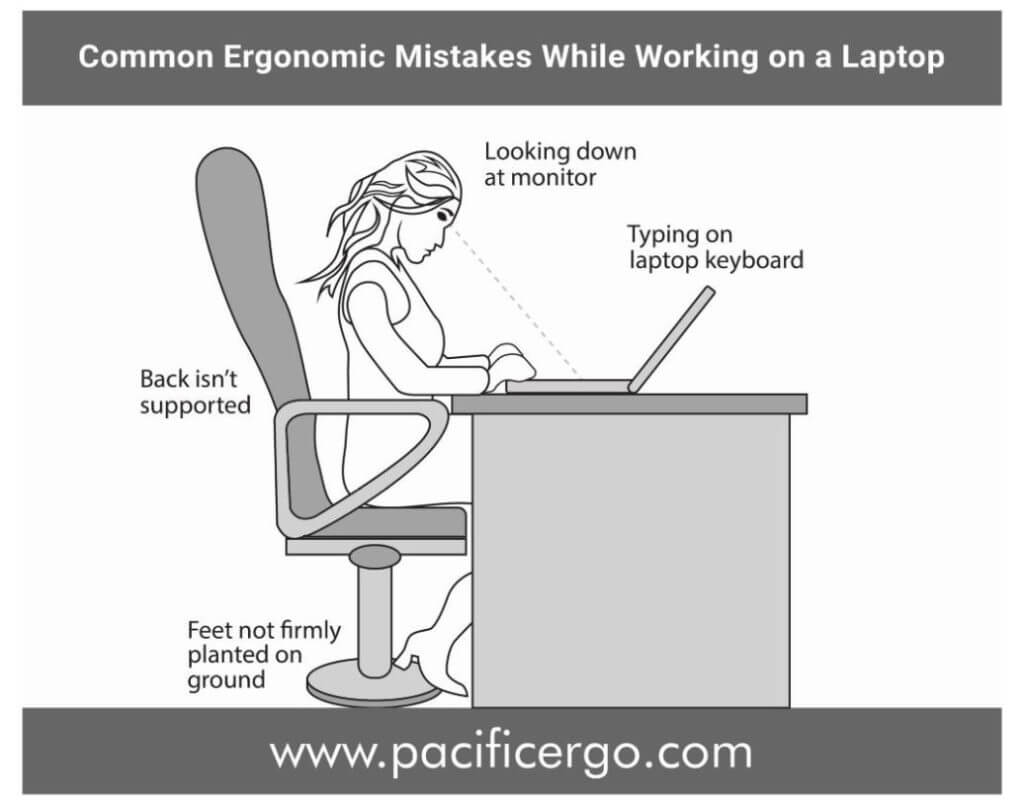
Slouching means bending your back forward. It puts pressure on your spine and neck. Forward head posture happens when your head leans too far toward the screen. This causes neck pain and headaches. Keep your back straight and your head aligned with your shoulders. Good posture feels natural and relaxed.
Wrist Position Issues
Typing with bent wrists causes strain and discomfort. Many people rest their wrists on the laptop edge or desk. This can lead to pain or carpal tunnel syndrome. Keep your wrists straight and slightly raised. Use a soft wrist rest or an ergonomic keyboard if possible.
Improper Screen Height
The laptop screen should be at eye level. Looking down or up strains your neck and shoulders. Most laptops sit too low on desks. Use a stand or stack books to raise your screen. Your eyes should look straight at the top third of the screen.
Credit: www.gatewayofindia.ky
Ergonomic Setup Tips
Good posture starts with the right workspace setup. Ergonomic tips help reduce strain and keep your body comfortable. A proper setup supports your back, neck, and wrists while typing on a laptop. Small changes can make a big difference in how you feel at the end of the day.
Adjusting Chair And Desk Height
Set your chair height so your feet rest flat on the floor. Your knees should be at a 90-degree angle or slightly lower. The desk height must allow your elbows to bend at about 90 degrees. Keep your shoulders relaxed and avoid hunching forward. This position reduces pressure on your lower back and wrists.
Using Laptop Stands
Laptop screens often sit too low, causing neck strain. Use a laptop stand to raise the screen to eye level. This helps you keep your head straight and your neck relaxed. A stable stand also improves airflow and prevents overheating. You can adjust the height and angle for the best comfort.
External Keyboard And Mouse Benefits
Typing on a laptop keyboard can force your wrists into awkward angles. An external keyboard and mouse let you position your hands naturally. This reduces wrist strain and risk of injury. You can place the keyboard and mouse at a comfortable distance and height. This setup helps maintain good posture for longer typing sessions.
Correct Typing Posture
Correct typing posture helps reduce strain on your body. It keeps your muscles relaxed and prevents pain. Good posture also improves typing speed and focus. Small changes in how you sit can make a big difference.
Neutral Spine Alignment
Keep your back straight and shoulders relaxed. Your spine should form a natural curve. Avoid slouching or leaning forward. Sit with your back against the chair for support. This helps reduce pressure on your lower back.
Proper Hand And Wrist Placement
Place your hands gently on the keyboard. Keep wrists straight, not bent up or down. Use a light touch while typing. Avoid resting your wrists on hard surfaces. This prevents strain and wrist pain.
Foot Positioning
Keep your feet flat on the floor. Do not cross your legs or tuck your feet under the chair. Feet should support your body weight evenly. Use a footrest if your feet do not reach the floor. This improves circulation and balance.
Exercises To Support Posture
Good posture while typing on a laptop is important. Exercises can help keep your body strong and flexible. These exercises focus on key areas that support better posture. They reduce pain and make sitting more comfortable.
Stretching Neck And Shoulders
Tight neck and shoulder muscles cause discomfort. Stretching these areas relieves tension and improves movement. Try gently tilting your head from side to side. Roll your shoulders slowly forward and backward. Hold each stretch for 15 seconds. Repeat several times during your work breaks.
Strengthening Core Muscles
Your core keeps your upper body stable while sitting. Strong core muscles support your spine and prevent slouching. Simple exercises like planks and seated leg lifts work well. Aim for two sets of 10 to 15 repetitions. Do these exercises three times a week for better results.
Wrist And Finger Mobility
Typing strains your wrists and fingers. Stretching and moving them can reduce stiffness. Try wrist circles and finger stretches regularly. Open your hands wide, then make a fist slowly. Perform these movements every hour to keep joints flexible. This helps prevent pain and improves typing comfort.
Breaks And Movement
Taking breaks and moving regularly is key to better posture while typing. Sitting for long hours strains your back, neck, and shoulders. Small pauses and simple movements ease this tension. They help keep your muscles active and your spine aligned. Your body feels less tired and more comfortable.
Pomodoro Technique For Movement
The Pomodoro Technique breaks work into short intervals. Usually, 25 minutes of work followed by 5 minutes of rest. Use these breaks to stand up and stretch. Walk around the room or do light stretches. This method helps refresh your body and mind. It stops stiffness and improves focus.
Simple Desk Exercises
Easy exercises at your desk can reduce muscle strain. Try shoulder rolls to loosen tight muscles. Neck stretches help relieve tension from looking at the screen. Wrist circles prevent discomfort from typing. These small moves take little time but give big relief.
Importance Of Regular Breaks
Regular breaks prevent posture problems and pain. Sitting too long causes slouching and poor alignment. Short breaks remind you to check your posture and adjust. Moving around boosts blood flow and reduces fatigue. Your body stays healthier and your typing feels easier.

Credit: www.avera.org
Choosing The Right Accessories
Choosing the right accessories can greatly improve your posture while typing on a laptop. The right tools help keep your body aligned. They reduce strain on your neck, shoulders, and wrists. Comfort increases, making long typing sessions easier. Here are some key accessories to consider.
Ergonomic Chairs
An ergonomic chair supports your back and promotes good posture. It adjusts to your body shape and height. Look for chairs with lumbar support to protect your lower back. The seat should allow your feet to rest flat on the floor. Armrests help keep your shoulders relaxed. A good chair prevents slouching and discomfort.
Adjustable Laptop Stands
Adjustable laptop stands raise your screen to eye level. This keeps your neck straight and reduces strain. You can tilt the stand for better viewing angles. Using a stand helps avoid hunching over your laptop. It also improves airflow, keeping your laptop cool. A stand works best combined with an external keyboard and mouse.
Wrist Supports And Cushions
Wrist supports reduce pressure on your wrists while typing. Cushions provide a soft resting place for your hands. They keep your wrists straight, preventing pain and injury. Look for gel or memory foam cushions for extra comfort. Using wrist supports helps avoid carpal tunnel syndrome. Comfortable wrists improve your typing speed and accuracy.
Frequently Asked Questions
How Can I Maintain Good Posture While Typing On A Laptop?
To maintain good posture, keep your back straight and shoulders relaxed. Position the screen at eye level and use an external keyboard if possible. Take frequent breaks to stretch and avoid slouching to reduce strain and improve comfort.
What Are The Best Ergonomic Tips For Laptop Typing?
Use a chair with good lumbar support and keep feet flat on the floor. Place the laptop screen at eye height and keep wrists straight while typing. Adjust your workstation to promote a neutral posture and reduce muscle fatigue.
How Often Should I Take Breaks While Typing On A Laptop?
Take a break every 30 to 45 minutes to avoid strain. Use breaks to stand, stretch, and move around. This helps improve circulation, reduce muscle tension, and maintain better posture throughout your work session.
Can Using An External Keyboard Improve Typing Posture?
Yes, an external keyboard allows better hand and wrist positioning. It helps keep the laptop screen at eye level and reduces neck and back strain. Using one promotes a more ergonomic setup and improves overall posture while typing.
Conclusion
Good posture while typing helps avoid pain and tiredness. Small changes make a big difference. Keep your back straight and shoulders relaxed. Take breaks often to stretch and move. Adjust your laptop height to keep your neck comfortable. These easy habits protect your health daily.
Stay mindful of how you sit and type. Your body will thank you with less strain. Start practicing now for better comfort and focus. Healthy posture leads to better work and well-being.