How to Prevent Carpal Tunnel from Computer Use

Are you feeling numbness, tingling, or pain in your hands after long hours at the computer? You might be at risk of developing carpal tunnel syndrome.
This common condition can slow you down, cause discomfort, and affect your daily life. But here’s the good news: you don’t have to suffer in silence or stop using your computer. By making a few simple changes, you can protect your hands and keep your work pain-free.
Keep reading to discover easy, effective ways to prevent carpal tunnel from computer use and take control of your hand health today.
Credit: www.saintalphonsus.org
Symptoms Of Carpal Tunnel
Carpal tunnel syndrome starts with small signs. These symptoms can affect your hands and wrists. Recognizing these early can help stop the problem from getting worse.
Early Warning Signs
Tingling or numbness in your fingers is common. This often happens in the thumb, index, and middle fingers. You might feel it most at night or after long computer use. Your fingers may feel weak or clumsy. Sometimes, a slight pain or burning sensation appears. These signs show that the nerve in your wrist is under pressure.
Common Discomforts
Many people feel a dull ache in the wrist or palm. The pain can spread to the forearm or elbow. It may become harder to grip objects firmly. Dropping things by accident is a frequent complaint. Stiffness and swelling can also occur. These discomforts often get worse with repeated hand movements. Ignoring them can lead to lasting damage.
Causes Linked To Computer Use
Carpal tunnel syndrome often starts with habits linked to computer use. Small, repeated actions and poor hand positions can cause pressure on the wrist. Understanding these causes helps protect your hands and avoid pain.
Repetitive Motions
Typing and clicking involve repeated hand movements. These repeated motions strain the tendons and nerves in your wrist. Over time, this strain can cause swelling and compress the median nerve. The result is numbness, tingling, or weakness in your fingers. Taking breaks and varying tasks reduces this risk.
Poor Wrist Positioning
Many people rest their wrists on hard surfaces while typing. This position bends the wrist unnaturally and increases pressure inside the carpal tunnel. Bending the wrist up or down for long periods causes nerve irritation. Keeping your wrists straight helps maintain healthy nerve function. Wrist supports or ergonomic keyboards can assist in proper positioning.
Ergonomic Workspace Setup
Setting up your workspace with good ergonomics helps reduce strain on your hands and wrists. It supports a natural posture and lowers the risk of carpal tunnel syndrome. Small changes in your desk, chair, keyboard, and mouse can make a big difference.
Keyboard And Mouse Placement
Place the keyboard and mouse close to each other. Keep them at the same height to avoid reaching. Your wrists should stay straight, not bent up or down. Use a keyboard tray or a desk surface that allows your hands to rest comfortably. Avoid resting your wrists on hard edges. Consider a wrist rest to support your hands gently. Keep the mouse within easy reach to prevent stretching.
Chair And Desk Height
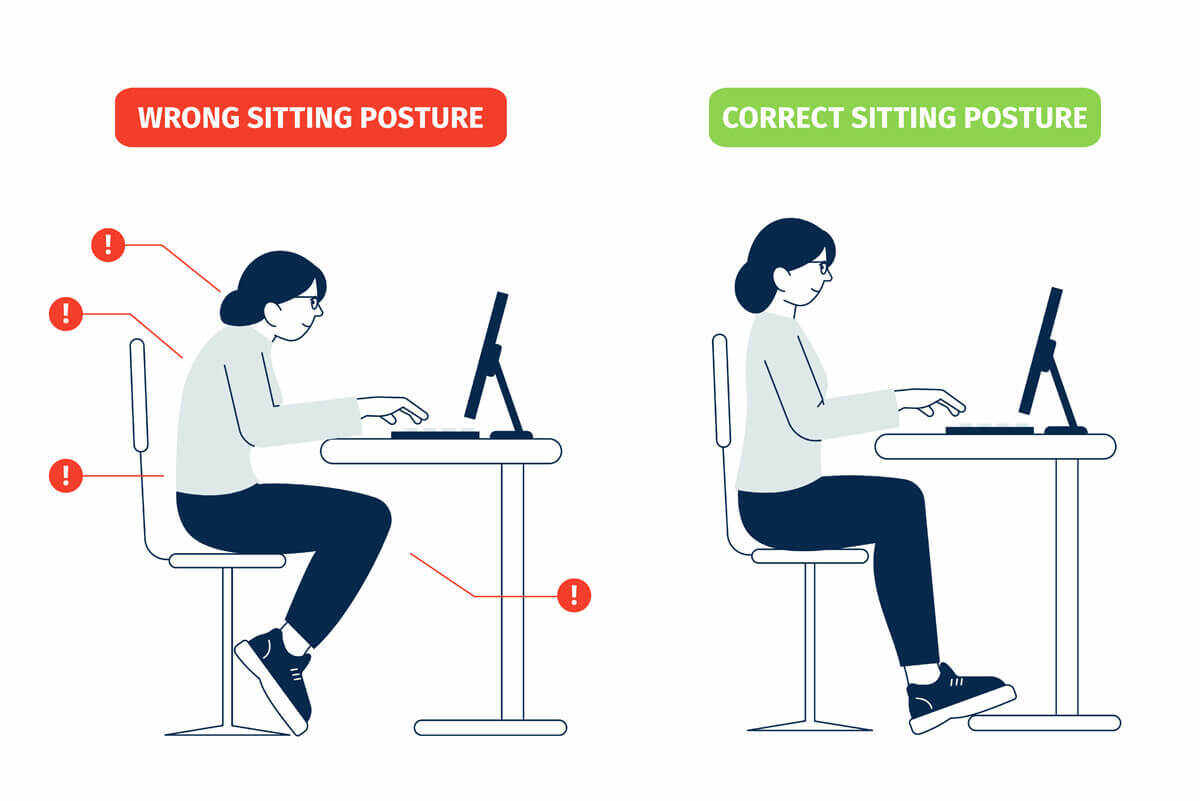
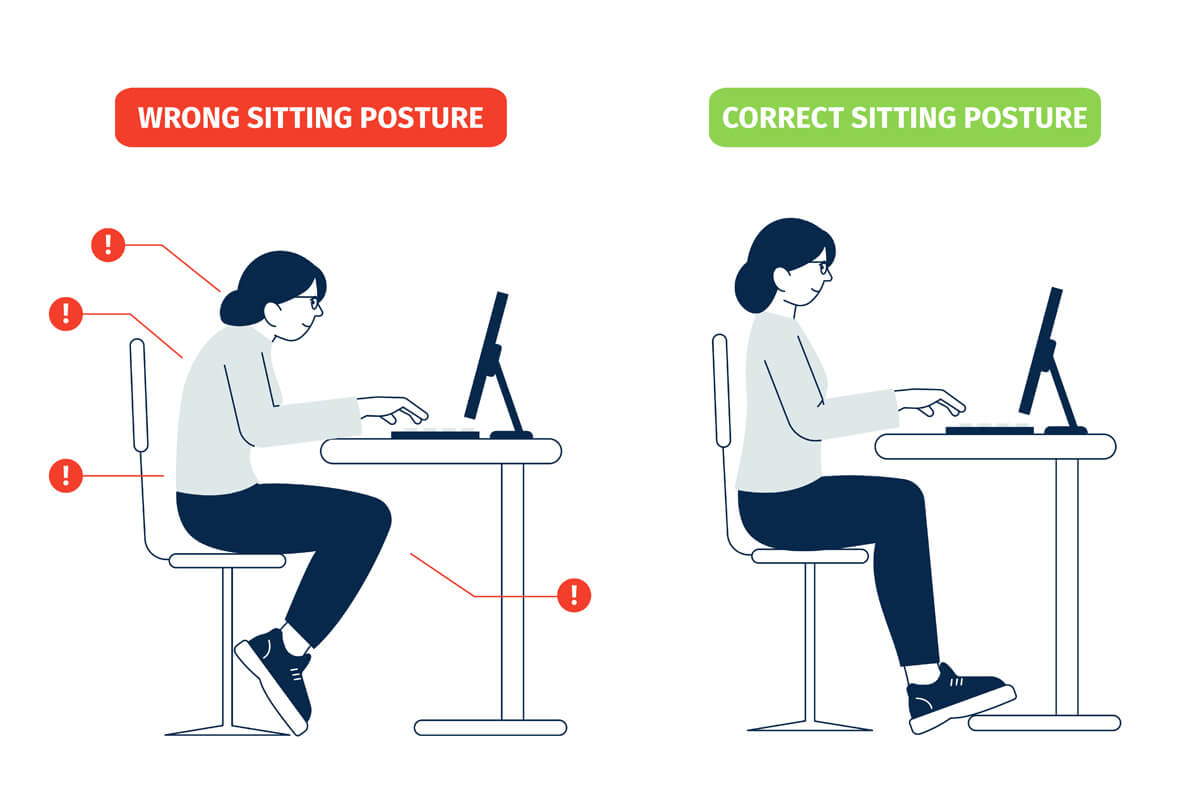
Adjust your chair height so your feet rest flat on the floor. Your knees should be at a 90-degree angle. The desk height should allow your elbows to bend at about 90 degrees too. Your forearms should be parallel to the floor. Sit close enough to the desk to avoid leaning forward. Keep your back supported by the chair. This posture reduces pressure on your wrists and arms.
Credit: handandwristinstitute.com
Effective Stretching Exercises
Effective stretching exercises help reduce tension in your wrists and hands. They improve blood flow and increase flexibility. These exercises lower the risk of carpal tunnel syndrome caused by long computer use. Doing simple stretches regularly can keep your wrists healthy and pain-free.
Wrist Flexor Stretches
Wrist flexor stretches target the muscles on the inner side of your forearm. Extend one arm in front, palm facing up. Use your other hand to gently pull your fingers down and back. Hold this stretch for 15 to 30 seconds. Repeat with the other hand. This stretch helps relieve tightness and improves wrist mobility.
Nerve Gliding Techniques
Nerve gliding exercises move the median nerve through the wrist and arm. Start with your arm out, palm facing up. Slowly bend your wrist back while straightening your fingers. Then, bend your wrist forward with fingers curled. Repeat this motion 5 to 10 times. These movements keep nerves flexible and reduce pressure inside the carpal tunnel.
Taking Regular Breaks
Taking regular breaks is key to preventing carpal tunnel from computer use. Short pauses help reduce strain on your wrists and hands. They give muscles a chance to relax and recover. Without breaks, continuous typing or mouse use can cause pain and numbness.
Frequent breaks keep blood flowing and reduce pressure on nerves. They also improve focus and reduce fatigue. Creating a habit of stepping away from the keyboard protects your hands over time.
Microbreaks During Work
Microbreaks last about 30 seconds to 1 minute. Use them to stretch your fingers, hands, and wrists. Shake your hands gently to relieve tension. Rotate your wrists in circles to keep joints flexible. These small moves prevent stiffness and pain. Take microbreaks every 20 to 30 minutes for best results.
Using Timers And Reminders
Timers and reminders help you remember to take breaks. Set an alarm every 30 minutes to pause work. Use phone apps or computer software with break alerts. These tools stop you from working too long without rest. Consistent breaks reduce the risk of developing carpal tunnel. They keep your hands healthy during long computer sessions.
Using Supportive Devices
Using supportive devices can help reduce the risk of carpal tunnel syndrome. These tools keep your hands and wrists in a better position. They ease pressure on nerves and tendons. Choosing the right device makes computer work safer and more comfortable.
Wrist Braces And Splints
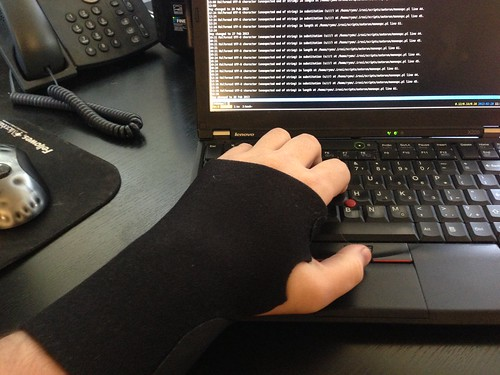
Wrist braces and splints hold your wrist in a straight position. This prevents bending that can cause nerve compression. Wearing a brace during work or sleep helps reduce pain and swelling. It also keeps your wrist stable during repetitive tasks. Braces are available in various sizes and materials for comfort.
Ergonomic Keyboards And Mice
Ergonomic keyboards and mice are designed to fit your natural hand position. They reduce strain on your wrists and fingers. These devices help keep your hands relaxed while typing or clicking. Using them lowers the chance of developing carpal tunnel symptoms. Ergonomic tools come in different shapes to suit your needs.
Lifestyle Habits To Support Wrist Health
Supporting wrist health requires daily lifestyle habits. These habits protect your wrists from strain and injury. Simple changes in your routine can reduce carpal tunnel risk. Healthy wrists help you work longer and feel better.
Maintaining Hydration
Water keeps your joints and tissues healthy. Drink enough water throughout the day. Proper hydration helps reduce swelling in your wrists. Swollen tissues can press on nerves and cause pain. Carry a water bottle to remind yourself to drink. Avoid sugary or caffeinated drinks that dehydrate you.
Strengthening Hand Muscles
Strong hand muscles support your wrist and reduce strain. Perform simple exercises to build strength. Squeeze a soft ball or use hand grips regularly. Stretch your fingers and wrists before and after work. Strong muscles improve blood flow and reduce stiffness. These habits lower the chance of nerve pressure.
When To Seek Medical Advice
Knowing when to seek medical advice for carpal tunnel is important. Early help can stop damage to your nerves and ease pain. Pay close attention to your symptoms. Some signs need quick action to avoid lasting problems.
Recognizing Severe Symptoms
Severe symptoms include constant numbness or tingling in your fingers. Weakness in your hand or trouble gripping objects is serious. Pain that wakes you up at night should not be ignored. If your symptoms do not improve with rest or home care, see a doctor. Loss of hand coordination or muscle wasting also needs prompt medical attention.
Available Treatment Options
Doctors may suggest wrist splints to keep your hand steady. Physical therapy can help improve strength and reduce pain. Medicines like anti-inflammatory drugs may ease swelling. In some cases, surgery might be necessary to relieve pressure on the nerve. Early treatment usually leads to better recovery and fewer complications.

Credit: midamortho.com
Frequently Asked Questions
What Are Early Signs Of Carpal Tunnel Syndrome?
Early signs include numbness, tingling, and pain in fingers. These symptoms often worsen at night or with prolonged computer use.
How Can Ergonomic Keyboards Help Prevent Carpal Tunnel?
Ergonomic keyboards reduce wrist strain by promoting a natural hand position. This decreases pressure on the median nerve, lowering carpal tunnel risk.
How Often Should I Take Breaks During Computer Use?
Take a 5-minute break every hour. Frequent breaks reduce wrist strain and improve blood flow, helping to prevent carpal tunnel syndrome.
What Wrist Exercises Can Prevent Carpal Tunnel?
Stretching and strengthening exercises like wrist flexion and extension improve flexibility. Regular exercises help relieve tension and reduce carpal tunnel risk.
Conclusion
Preventing carpal tunnel starts with small, daily changes. Take breaks often and stretch your hands. Keep your wrists straight while typing or using a mouse. Use a proper chair and desk to support good posture. Avoid long hours of continuous computer use.
These habits help reduce pain and keep your hands healthy. Simple steps can protect you from carpal tunnel pain. Stay aware of your body’s signals and act early. Healthy hands mean more comfort and better work every day.