How to Prevent Carpal Tunnel from Computer Use

Do your wrists often feel numb or tingly after hours at the computer? You might be heading toward carpal tunnel syndrome without even realizing it.
But don’t worry—you have the power to stop this pain before it starts. You’ll discover simple, effective ways to protect your hands and keep discomfort at bay. Keep reading, because your comfort and health are worth every second you spend on your keyboard.

Credit: midamortho.com
Causes Of Carpal Tunnel In Computer Users
Carpal tunnel syndrome is a common problem for people who use computers often. It happens when the median nerve in the wrist is squeezed. This causes pain, numbness, and weakness in the hand. Understanding the causes helps to prevent it.
Repetitive Motions
Typing and clicking the mouse involve repeating the same hand movements. These repeated actions strain the wrist and fingers. Over time, this can irritate the tendons and nerves. The constant motion increases pressure inside the carpal tunnel.
Poor Wrist Position
Using a keyboard or mouse with bent wrists adds stress. Bending the wrist up, down, or sideways tightens the carpal tunnel area. Poor posture keeps the median nerve under pressure. It can cause pain and reduce hand strength over time.
Prolonged Keyboard Use
Long hours of keyboard use without breaks worsen wrist strain. Holding the same position for too long limits blood flow. This causes swelling and discomfort in the wrist. Taking breaks and moving hands often helps reduce these effects.
Credit: www.saintalphonsus.org
Ergonomic Setup Tips
Setting up your workspace correctly can reduce stress on your wrists. Ergonomic setup helps prevent carpal tunnel from long hours at the computer. Small changes make a big difference in comfort and health.
Proper Keyboard Placement
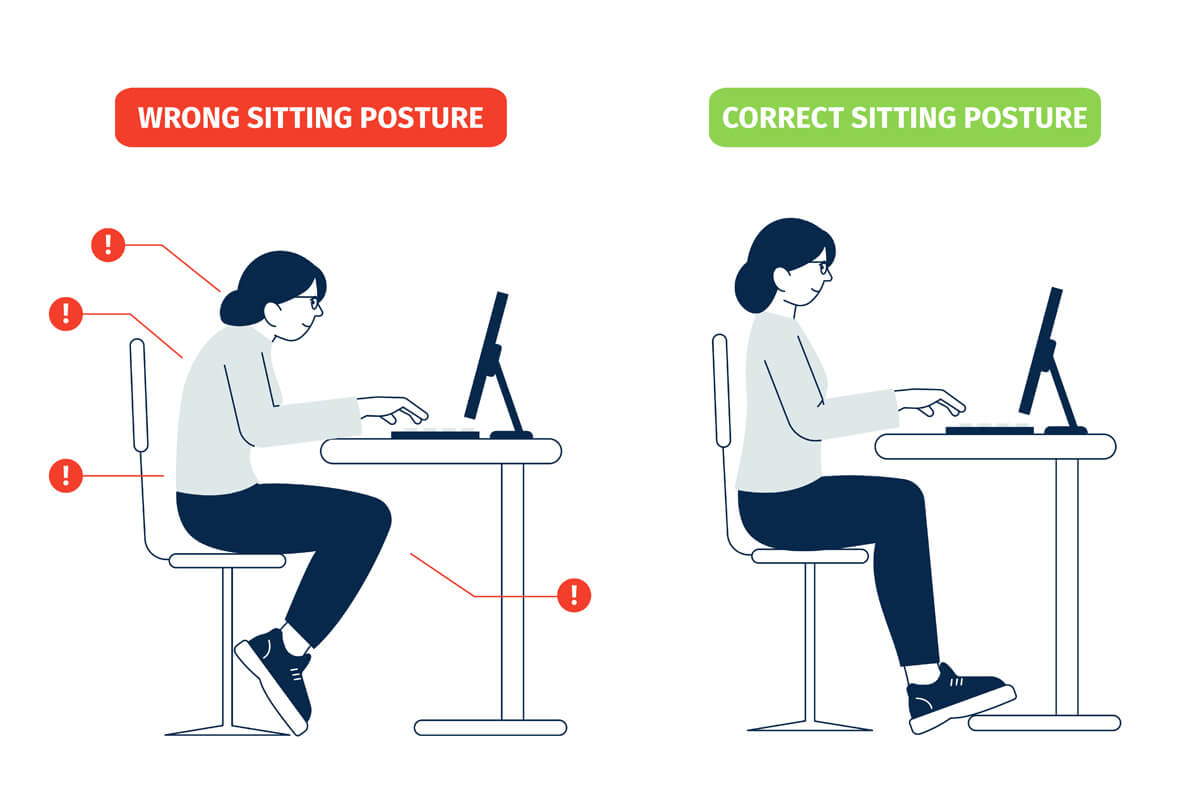
Place the keyboard at a height where your wrists stay straight. Keep it close to avoid reaching. Your elbows should be near your body and bent at about 90 degrees. Avoid resting your wrists on the desk or keyboard edge while typing.
Adjusting Chair Height
Set your chair height so your feet rest flat on the floor. Your thighs should be parallel to the ground. Adjust the chair so your arms are level with the keyboard. This position reduces pressure on your wrists and shoulders.
Using Wrist Supports
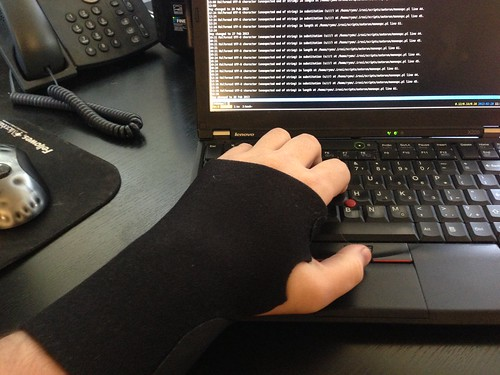
Use wrist supports or pads to keep your wrists in a neutral position. Choose soft, cushioned supports that do not force your wrists upward or downward. Avoid resting your wrists on hard surfaces for long periods.
Effective Stretching Exercises
Stretching exercises help keep your wrists and hands flexible. They reduce tension from long computer use. Regular stretches improve blood flow and ease tight muscles. These simple moves protect your wrists from strain and pain.
Wrist Flexor Stretches
Hold your arm straight with the palm facing up. Use your other hand to gently pull your fingers down and back. Hold this stretch for 15 to 30 seconds. Feel the stretch along your wrist and forearm. Repeat with the other hand. This stretch loosens the muscles that get tight while typing.
Finger Extension Moves
Place your palm on a flat surface, fingers spread. Slowly lift each finger one by one. Hold each finger lifted for a few seconds. Then, try lifting all fingers together. This exercise strengthens your fingers and improves their movement. It helps prevent stiffness from long computer sessions.
Forearm Rotations
Sit with your elbows bent at your sides. Turn your palms up, then slowly rotate them down. Make slow circles with your wrists. Do this for 10 to 15 seconds in each direction. Forearm rotations relax the muscles and tendons around your wrists. They reduce the risk of carpal tunnel symptoms.
Credit: handandwristinstitute.com
Break Strategies During Work
Taking breaks during computer work helps reduce stress on your hands and wrists. It also lowers the chance of carpal tunnel syndrome. Short pauses give your muscles a chance to relax. Your body feels less tired. Your mind stays fresh and focused.
Scheduled Microbreaks
Set a timer to take breaks every 20 to 30 minutes. Just 30 seconds to a minute is enough. Stand up, stretch, and move your hands. These breaks stop your muscles from getting too tight. They also improve blood flow to your fingers and wrists.
Hand Relaxation Techniques
During breaks, gently shake your hands to release tension. Stretch your fingers wide, then slowly make a fist. Repeat this several times. Try wrist rotations by moving your wrists in circles. These exercises help keep your joints flexible and reduce stiffness.
Eye And Neck Rest
Look away from the screen every 20 minutes. Focus on something 20 feet away for 20 seconds. This reduces eye strain and helps your neck relax. Also, gently tilt your head side to side and forward. These small moves ease tension in your neck and shoulders.
Choosing The Right Tools
Choosing the right tools can reduce strain on your hands and wrists. Using proper equipment supports natural hand positions. This lowers the risk of carpal tunnel from long computer use. Simple changes in tools can make a big difference.
Ergonomic Keyboards And Mice
Ergonomic keyboards keep your hands in a natural position. They reduce bending of the wrists. Split or curved designs help lower pressure on nerves. Ergonomic mice fit your hand shape better. They require less force and movement. These tools help prevent pain and numbness.
Voice Recognition Software
Voice recognition software lets you control your computer by speaking. This reduces the need for typing and clicking. It gives your hands a break from repetitive movements. Using voice commands can lower wrist stress. It helps prevent carpal tunnel symptoms.
Adjustable Desk Options
Adjustable desks let you change your working height easily. You can switch between sitting and standing positions. This keeps your wrists at a comfortable angle. Proper desk height reduces wrist bending and pressure. Adjustable desks help maintain good posture and reduce strain.
Lifestyle Habits To Support Wrist Health
Healthy lifestyle habits help protect your wrists from carpal tunnel syndrome. Small daily choices can reduce strain and improve wrist comfort. Focus on habits that keep your body strong and your joints flexible. These habits support wrist health and make computer use easier.
Maintaining Hydration
Water helps keep your joints and tissues flexible. Drink water throughout the day to avoid stiffness. Dehydration can cause swelling and discomfort in your wrists. Keep a water bottle nearby and sip often.
Regular Physical Activity
Exercise improves blood flow to your wrists. Simple wrist stretches and hand exercises reduce tension. Take breaks from typing to move your hands and arms. Regular activity lowers the risk of pain and injury.
Balanced Nutrition
Eat foods rich in vitamins and minerals. Nutrients like vitamin B6 and magnesium support nerve health. Include fruits, vegetables, nuts, and whole grains in your diet. Good nutrition helps your body repair and stay strong.
When To Seek Medical Advice
Knowing when to seek medical advice for carpal tunnel is important. Early action can stop symptoms from getting worse. Do not ignore any persistent pain or numbness. A doctor can provide the right diagnosis and help with treatment.
Recognizing Early Symptoms
Early signs include tingling or numbness in fingers. Pain or weakness in your hand is common. Symptoms often appear during or after computer use. Notice if symptoms wake you at night. These signs mean it is time to see a doctor.
Available Treatment Options
Doctors may suggest wrist splints to ease pressure. Anti-inflammatory medicines help reduce swelling and pain. Physical therapy can improve wrist strength and flexibility. In serious cases, surgery might be needed to relieve pressure.
Preventive Medical Measures
Medical professionals recommend regular breaks during computer work. Exercises to stretch and strengthen the wrist help prevention. Adjusting your workstation reduces wrist strain. Early treatment prevents long-term damage and improves recovery.
Frequently Asked Questions
What Are Early Signs Of Carpal Tunnel From Computer Use?
Early signs include numbness, tingling, and weakness in the fingers. Pain or discomfort in the wrist may also appear. Recognizing these symptoms early helps prevent further damage and allows for timely treatment and ergonomic adjustments.
How Can Ergonomic Keyboards Prevent Carpal Tunnel?
Ergonomic keyboards reduce wrist strain by promoting natural hand positioning. They minimize pressure on the median nerve, which causes carpal tunnel syndrome. Using these keyboards can significantly lower the risk of developing symptoms from prolonged computer use.
How Often Should I Take Breaks To Avoid Carpal Tunnel?
Taking a 5-10 minute break every hour helps reduce wrist strain. Regular breaks improve blood flow and prevent repetitive stress injuries. This habit supports wrist health and lowers the risk of carpal tunnel syndrome.
What Exercises Help Prevent Carpal Tunnel From Typing?
Wrist stretches, finger flexing, and hand rotations improve flexibility and reduce tension. These exercises enhance circulation and relieve pressure on nerves. Incorporating them into your routine can prevent carpal tunnel symptoms.
Conclusion
Preventing carpal tunnel starts with good habits at your desk. Take breaks often and stretch your hands. Keep your wrists straight while typing or using a mouse. Use ergonomic tools to reduce strain. Small changes each day protect your hands.
Stay aware of any pain or numbness. Act early to avoid serious problems. Healthy habits keep you comfortable and productive. Simple steps make a big difference over time. Your hands deserve care during computer use.