Why Does My Laptop Screen Hurt My Eyes at Night

Have you ever noticed your eyes feeling tired, dry, or even sore after using your laptop at night? You’re not alone.
Many people struggle with eye discomfort when staring at screens in the dark. But why does your laptop screen hurt your eyes at night, even if everything seems fine during the day? Understanding this can help you protect your vision and feel more comfortable.
Keep reading to discover the surprising reasons behind this common problem and simple steps you can take right now to ease the strain on your eyes.
Credit: my.clevelandclinic.org
Causes Of Eye Strain From Laptop Screens
Eye strain from laptop screens at night is a common problem. Several factors cause this discomfort. Understanding these causes helps reduce eye pain and improve comfort.
Blue Light Emission
Laptop screens emit blue light, which is harsh on the eyes. Blue light can disrupt sleep and cause eye fatigue. At night, the effect is stronger because the eyes are more sensitive in low light.
Screen Brightness And Contrast
Bright screens can cause glare and strain your eyes. Too much contrast makes it hard to focus. Both high brightness and contrast tire your eyes faster than moderate levels.
Flickering And Refresh Rates
Some laptop screens flicker, even if it is hard to see. Flickering strains the eyes and causes headaches. Low refresh rates increase flicker, leading to more discomfort during use.
Poor Viewing Angles
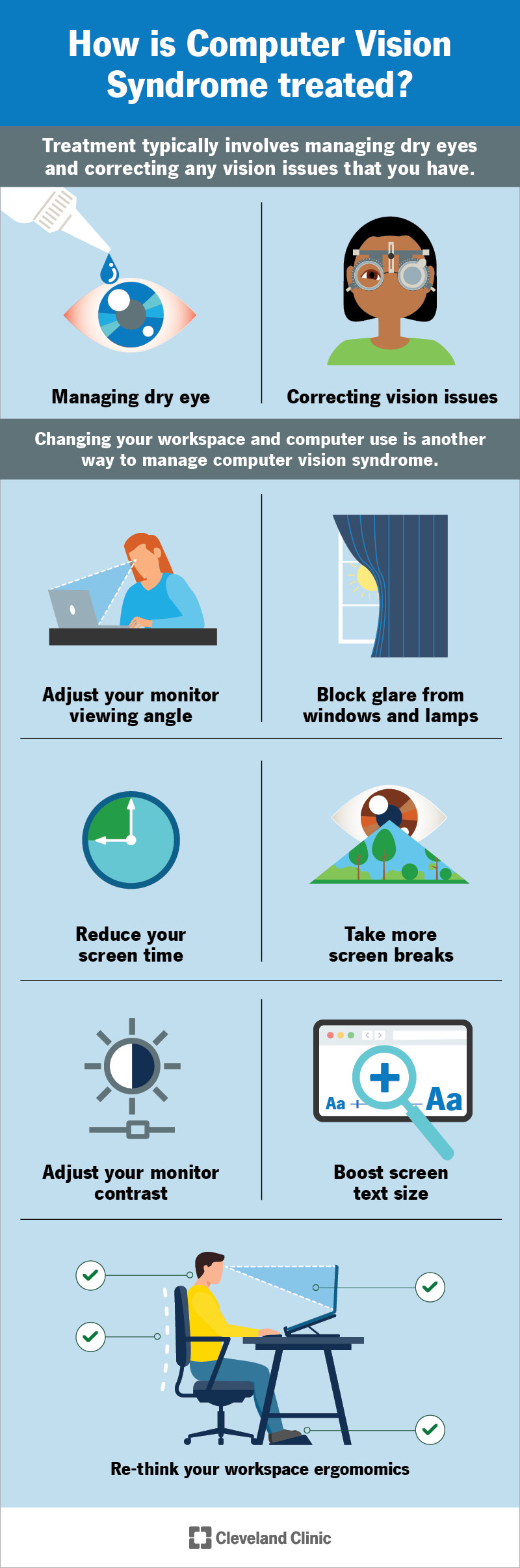
Viewing the screen from an awkward angle forces your eyes to work harder. Tilting or sitting too close leads to blurred vision and strain. Proper screen positioning reduces eye stress significantly.
Prolonged Screen Time
Staring at a laptop for long periods causes dry, tired eyes. Lack of blinking and constant focusing lead to discomfort. Taking breaks and limiting screen time helps protect your eyes.
Credit: www.bswhealth.com
Effects Of Nighttime Laptop Use On Eyes
Using a laptop at night can cause several problems for your eyes. The screen’s bright light and blue light affect how your eyes feel and work. Understanding these effects helps you protect your vision and comfort.
Disruption Of Sleep Patterns
The blue light from laptop screens tricks your brain. It stops the production of melatonin, the sleep hormone. This makes falling asleep harder and reduces sleep quality. Poor sleep can make your eyes feel tired and strained the next day.
Increased Dryness And Irritation
People blink less while staring at screens. This causes tears to evaporate quickly. Your eyes become dry, itchy, and irritated. Dry eyes can lead to discomfort and redness, making night use painful.
Headaches And Eye Fatigue
Bright screens cause your eye muscles to work harder. This leads to eye strain and headaches. Prolonged screen time without breaks increases this pain. Eye fatigue reduces focus and causes discomfort.
Ways To Reduce Eye Discomfort At Night
Eye discomfort from laptop screens at night is common. Simple changes can help reduce this problem. Small steps improve comfort and protect your eyes during late-night use.
Using Blue Light Filters
Blue light from screens strains the eyes more at night. Blue light filters reduce this harsh light. Many laptops have built-in filters or apps to adjust screen color. Using these filters lowers eye strain and helps you feel better.
Adjusting Screen Brightness
Bright screens cause discomfort in dark rooms. Lower your screen brightness to match room light. Avoid very bright or very dim settings. A balanced brightness level makes viewing easier on your eyes.
Taking Regular Breaks
Staring at screens without breaks tires your eyes quickly. Follow the 20-20-20 rule: every 20 minutes, look 20 feet away for 20 seconds. Regular breaks relax eye muscles and reduce dryness.
Optimizing Room Lighting
Dark rooms with bright screens increase eye strain. Use soft lighting in your room to balance screen light. Avoid glare and reflections on the screen. Good room lighting helps your eyes adjust better.
Maintaining Proper Distance
Sitting too close or too far from the screen hurts your eyes. Keep your laptop about 20-30 inches away. Position the screen slightly below eye level. Proper distance and angle reduce strain and improve comfort.

Credit: www.ojaseyehospital.com
Best Laptop Settings For Night Use
Using your laptop at night can strain your eyes. Bright, blue light makes your eyes tired and uncomfortable. Adjusting your laptop settings helps reduce this strain. These simple changes make night use easier and protect your eyes.
Enabling Night Mode
Night mode changes your screen to warmer colors. It reduces blue light that hurts your eyes. Turn on night mode in your laptop settings. This feature works automatically at set times. It lowers eye strain and improves sleep quality.
Customizing Color Temperature
Color temperature controls the warmth of your screen colors. Cooler colors have more blue light. Warmer colors are softer and easier on your eyes. Adjust the color temperature to a warmer tone. Find a setting that feels comfortable for long use.
Reducing Screen Flicker
Screen flicker can cause headaches and eye pain. It happens when the screen refresh rate is too low. Increase the refresh rate in display settings to reduce flicker. Use a higher brightness only when necessary. Flicker-free screens protect your eyes better.
When To See An Eye Specialist
Knowing when to see an eye specialist is important for your eye health. Many people feel eye strain from laptop screens at night. Some problems clear up after rest. Others need professional care. Understanding the signs can help you protect your vision and comfort.
Persistent Discomfort Symptoms
Eye pain that lasts for days needs attention. Burning, itching, or sharp pains are warning signs. Blurred vision or constant dryness also matters. If discomfort does not improve after breaks, see a specialist. Early care can prevent serious issues.
Vision Changes
Sudden changes in vision require quick action. Trouble focusing or double vision can indicate problems. Frequent headaches with screen use are a red flag. If your eyes feel heavy or blurry, get checked. Timely visits keep your eyes healthy.
Recommendations For Eye Health
Eye specialists suggest regular eye exams for screen users. Using blue light filters may reduce strain. Adjusting screen brightness to room light helps too. Taking short breaks every 20 minutes protects your eyes. Follow expert advice to keep your vision clear.
Frequently Asked Questions
Why Does My Laptop Screen Hurt My Eyes At Night?
Laptop screens emit blue light that strains your eyes, especially in dark environments. This light disrupts your sleep cycle and causes discomfort. Reduced ambient light at night makes your eyes work harder, leading to fatigue and irritation.
How Does Blue Light From Laptops Affect My Eyes?
Blue light penetrates deep into the eyes, causing digital eye strain and dryness. Prolonged exposure may disrupt melatonin production, affecting sleep quality. Using blue light filters or night mode can reduce these negative effects.
Can Adjusting Screen Brightness Reduce Eye Pain?
Yes, lowering screen brightness to match room lighting helps prevent eye strain. Excessive brightness causes glare and discomfort, especially in dark rooms. Balance brightness for comfort and improved visual clarity during night use.
Is Using Night Mode On Laptops Effective For Eye Comfort?
Night mode reduces blue light emission by warming screen colors. This feature eases eye strain and helps maintain your natural sleep cycle. Activating night mode during night use improves visual comfort and reduces eye fatigue.
Conclusion
Eye strain from laptop screens at night is common and fixable. Bright light and blue rays tire your eyes quickly. Adjusting screen brightness and using night mode helps a lot. Taking breaks often gives your eyes needed rest. Wearing glasses with blue light filters can reduce discomfort.
Creating a darker room with soft lighting also eases strain. Small changes make a big difference in how you feel. Protect your eyes to work or relax better at night. Your comfort matters for health and focus. Take care of your eyes every day.